
HailTrace pricing and alternatives: is RoofHeadsUp the right fit?
A practical comparison for roofing owners weighing a broad weather platform against a focused storm-alert and address-report service.
I’m the founder of RoofHeadsUp. This is a product-fit comparison with that bias disclosed, not an independent ranking. HailTrace offers capabilities we do not replace, particularly deeper weather analysis and specialist report products.
HailTrace cost: what to ask before comparing quotes
The official HailTrace plans page distinguishes Maps Only, Maps & Data, Enterprise, and a limited free option. Paid tiers direct buyers to contact the company. A standalone weather report and a platform subscription are different purchases.
- Which territories and team members does the quote cover?
- Are property data, lead-list generation, and canvassing included?
- Which weather reports are included, and which cost extra?
- What is the commitment, renewal price, and cancellation process?
We do not use a guessed HailTrace subscription price to calculate savings. Put its written quote next to the workflow your crew needs, then compare.
RoofHeadsUp · published monthly pricing
1 service area
3 service areas
10 service areas
14-day trial. Every paid plan includes hail alerts, ranked address reports, and government roofing bids. Compare plan details.
Compare capabilities, not just the monthly bill
| HailTrace | RoofHeadsUp | |
|---|---|---|
| Main job | Weather intelligence with mapping, data, and field tools depending on plan | Market-specific hail alerts and ranked address workbooks |
| Weather documentation | Weather-history and meteorologist-reviewed report products | Field prioritization only; not insurance evidence |
| Property workflow | Property data and canvassing features vary by subscription | Up to 500 candidate addresses, distance context, and street summary |
| Crew handoff | Evaluate the maps, reports, and field tools included in your quote | Email plus a three-tab XLSX workbook |
| Coverage | Confirm the weather and territory scope in your quote | Service areas in TX, OK, KS, CO, NE, and MO |
Choose HailTrace if…
Your operation needs deeper weather intelligence, or you regularly purchase specialist weather documentation. Review its report products and the features included in your proposed subscription. A lower-priced address workbook would not replace those needs.
Choose RoofHeadsUp if…
Your immediate bottleneck is turning a qualifying hail report into a field plan for a small crew. You want transparent service-area pricing, an alert after the scheduled hourly scan, and a spreadsheet that helps a manager choose streets to check. Every paid plan includes government roofing bids, but those opportunities still require the contractor to assess eligibility and bid.
A practical trial: one storm, one crew, one decision
Take a sample workbook from a state where you work. Have a rep open the Storm Brief, choose a candidate cluster from Street Summary, and explain where they would begin verifying conditions. Then compare that process with the HailTrace demonstration. Judge the time and information needed to make the decision, not how many features appear on a sales page.
Both tools can be useful if your crew needs different outputs. Neither a storm map nor an address list proves damage at a property or guarantees homeowner interest. For a wider view, see our hail-map buying guide.
Inside the workbook
From storm context to streets worth checking.
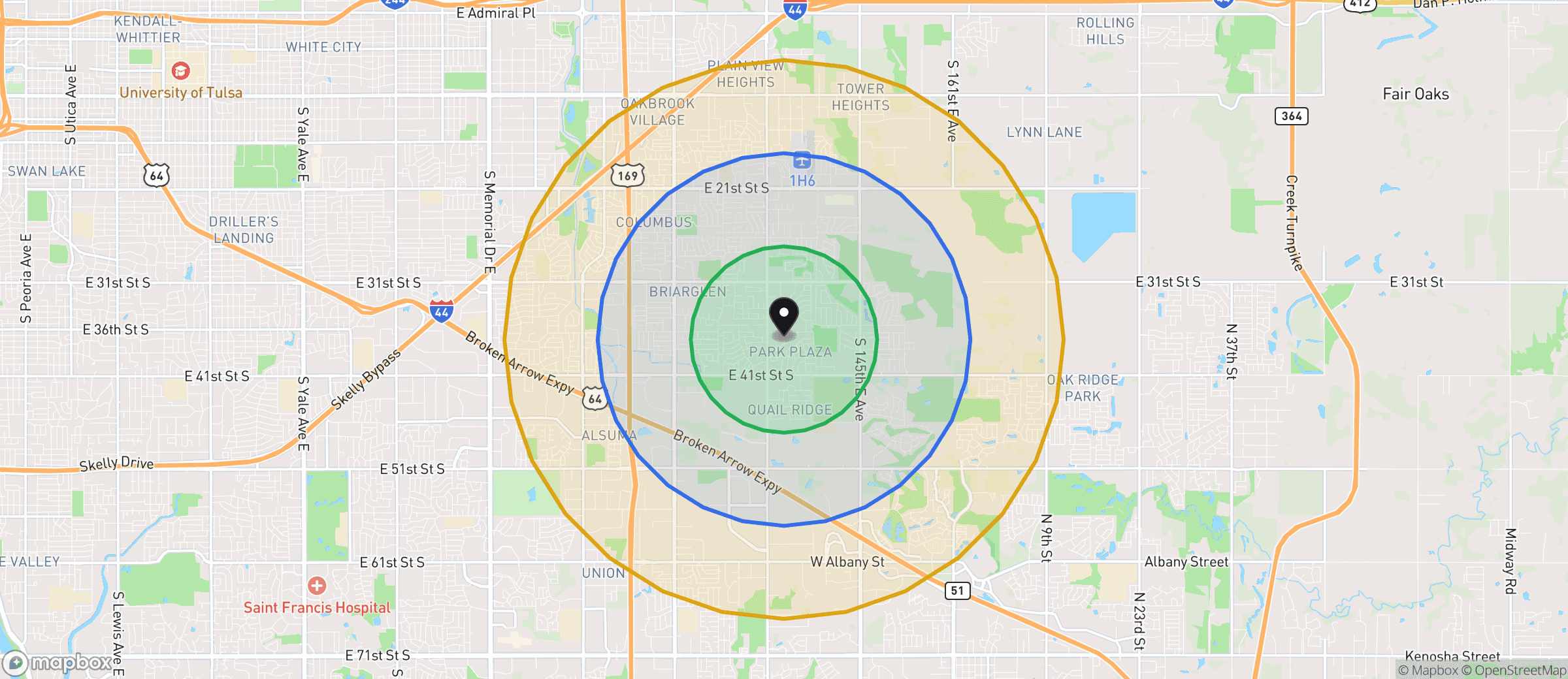
Example workbook map · Oklahoma · distance tiers, not a verified damage boundary.
- 01 / CONTEXT
Storm Brief
Review location, timing, reported hail size, and the map before sending anyone out.
- 02 / PRIORITIZE
Address Candidates
Work through up to 500 ranked candidate addresses. Proximity is a reason to check, not a damage finding.
- 03 / PLAN
Street Summary
Find clusters of candidate addresses, then plan your own field route and verify conditions.